Security Events answers “did a security product act — and which rule?” Quote Action + Service + Rule + Ray ID. Trace answers “what would this simulated request match, in evaluation order?” Ray ID is the ticket number on the error page and in cf-ray. A WAF exception skips one managed rule or ruleset for a path. A custom Skip can skip remaining custom rules, rate limiting, Super Bot Fight Mode, all managed rules, or products such as Browser Integrity Check. Log Explorer answers “what exactly happened for this Ray ID?” when Sampled logs are empty. A Managed Challenge is not a block. Empty Sampled logs is not “skip everything.” Trace is not production traffic.
1. Why a 403 is five questions
Concept: Operators collapse five WAF failures into one sentence. A managed rule blocked /api/checkout. Sampled logs hid the Ray ID. The custom rule you shipped never evaluated. Someone already skipped the whole managed phase. The origin never saw the request because an IP Access Allow never reached custom rules — or a rewrite changed the path first. Those are five first clicks, not one “open WAF and disable.”
The evidence desk taught you which dashboard proves Cloudflare is working. This command center is the war-room when the edge already answered and the answer is 403 / challenge / “checkout is dead.” You isolate one transaction, name the rule, then ship the smallest skip that restores that path — not the tenant.

If they say “checkout is blocked by Cloudflare,” do not say “I skipped Managed Rules.” Say: “I prove the verdict in Security Events with Action + Rule + Ray ID. If Sampled logs are empty I query Log Explorer WHERE RayID. If the question is ‘would this match?’ I use Trace. The fix is a zone-level exception for that managed rule and path — not Skip all remaining.”
2. Mental model — five war-room surfaces
Path: Memorise five named objects before you click. Each surface is allowed to prove one thing. Over-claiming a field is how you skip http_request_firewall_managed at 02:00 and open a false-negative ticket at 09:00.
1 · Security Events
Zone Analytics → Events tab (deeplink /security/analytics). Proves one mitigated or flagged request: Action + Service + Rule + Ray ID. Does not prove un-actioned traffic or a simulated match.
2 · Trace
Account Trace (/trace). Simulates an HTTP/S request. Proves which active rules would evaluate and execute, in order. Administrator or Super Administrator. Does not prove what production just did.
3 · Ray ID
Every request through Cloudflare gets a Ray ID (cf-ray). The error page prints it. Sampled logs can hide it. Next official door is Log Explorer. Official caveat: Ray IDs are not guaranteed unique.
4 · Skip / exception
Exception = skip one managed rule or ruleset for an expression. Path: Security rules → Create → Managed rules. Custom Skip = skip remaining custom rules, phases, or products. Custom rules have no Allow.
5 · Log Explorer
Account Log Explorer → Log Search (/log-explorer/log-search). Proves the forensic row: RayID + Action + RuleID + Source. Actual traffic. Not a Trace replay.
Hard words, once
Terminating action = block / challenge / managed_challenge stop later rules. Skip is not terminating. Exception lives in http_request_firewall_managed and only skips execute rules listed after it. firewall_events is the Logpush dataset. IP Access Allow bypasses custom rules and does not appear in Events.
Read left → right. Each box is allowed one claim. If you cannot name the field, you are not proving — you are guessing.
I prove the verdict, then the what-if, then the Ray ID row, then the smallest skip. I do not skip all managed rules, pause the zone, or Allow an IP until I can quote the field that made me do it.
3. Decision flow — ticket → first tool
Flowchart first. Do not open Security rules → Create rule until a diamond says so.
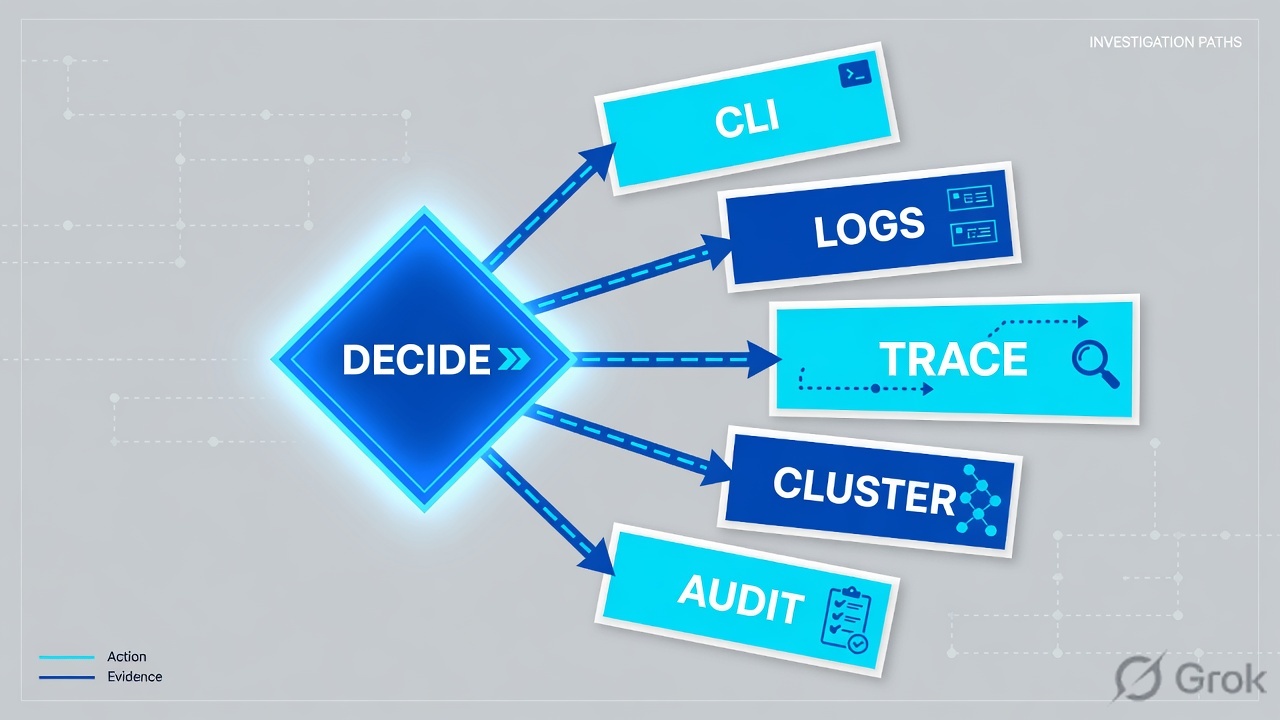
Read the diamond first. “Should have fired” never starts in Log Explorer. A named RuleID false positive never starts as Skip all remaining. Empty Events with no Ray ID is an evidence-desk ticket, not a skip ticket.
4. How to choose — first tool + proof field
Do: Print this next to the dashboard. If you cannot recite the proof field, you are not ready to create an exception.
| If the ticket says… | First tool (official path) | Proof field | Do not open first |
|---|---|---|---|
| 403 / challenge / “Cloudflare blocked checkout” | Zone Analytics → Events · Sampled logs. Deeplink /security/analytics |
Action (block / managedchallenge / challenge / log / skip) + Service + Rule + Ray ID |
Skip all remaining / skip all managed rules |
| Ray ID on the error page, Sampled logs empty | Narrow the Events window, then account Log Explorer → Log Search | WHERE RayID = '…' then Action + RuleID + Source |
A global WAF disable |
| “This rule should have fired” after you shipped it | Account Trace · /trace (Administrator / Super Administrator) |
Evaluated and executed configurations, in evaluation order | Log Explorer (that is what did happen) |
| Named managed-rule false positive on one path | Security rules → Create → Managed rules (zone exception) | Exception type = skip specific rule(s) + expression on host + path | Custom Skip → All managed rules |
| Attacks still land after a broad skip; Events show skip | Events filter Action = skip, then edit the exception / skip expression | Action = skip + the exception name / Rule · tighten starts_with(path) |
Another Skip all remaining on top |
Security Events may use sampled data. Official Ray ID docs: if sampled data is applied, you might not see all events and filters might not return the expected results. Narrow the time window, then escalate the same Ray ID to Log Explorer or a Logpush firewall_events job. Do not declare “no hit” — and do not skip a ruleset — from one empty Sampled-logs page.
WAF exception skips WAF managed rulesets (or some of their rules) under an expression. It does not skip Browser Integrity Check or Zone Lockdown — those need a custom Skip and the product checkbox. Custom Skip can skip remaining custom rules, phases (http_ratelimit, http_request_sbfm, http_request_firewall_managed), or products. You cannot skip Bot Fight Mode (Free), only Super Bot Fight Mode. IP Access Allow bypasses custom rules, rate limiting, and most Managed Rules; matches do not appear in Security Events. Custom rules have no Allow action.
5. Runbook Side A → B → C
Side A isolates the live verdict (Events + Ray ID). Side B proves the what-if and chooses skip vs exception (Trace + Security rules). Side C confirms the forensic row and closes the ticket (Log Explorer). On a messy Sev-2, do them in this order until a field lights up.
Side A — Security Events + Ray ID (the live verdict)
-
Lock one transaction before you open WAF
Write hostname, path, method, UTC minute, client IP (lab:
203.0.113.88), and the Ray ID from the error page orcf-ray. Official: every request through Cloudflare gets a Ray ID; it is also added toward origin ascf-ray. If you have no Ray ID and no 403 body, this is still an evidence-desk ticket first. -
Open Security Events, not the rule editor
Official path: in the Cloudflare dashboard go to the Analytics page for the zone, then select the Events tab. Deeplink:
dash.cloudflare.com/?to=/:account/:zone/security/analytics. Enterprise also has account-level Security events. Source: Security Events — Location in the dashboard. -
Filter, then read the columns that close a WAF ticket
Select Add filter. Field / operator / value — no quotes, no
ASprefix on ASN, no wildcards. Filter Ray ID if you have it; otherwise Host + Path + Action. Expand the Sampled log. QuoteActionand the applied security feature (Managed rules, Rate limiting rules, Custom rules, Bot Fight Mode). A single HTTP request can generate more than one security event. Source: Security Events — Sampled logs; Event actions. -
If Events is empty, do not invent a skip
Empty Sampled logs means either nothing was actioned/flagged, sampling hid the row, or an IP Access Allow never reached WAF (those matches do not appear in Events). Narrow the duration (official sampling advice). Then jump to Side C. Source: Security Events — Sampling; Rule phase interactions.
Analytics / Events / Sampled logs
Security Events
| Time (UTC) | Action | Service | Rule | Ray ID |
|---|---|---|---|---|
| 01:28:11 | log | Managed rules | 100015 | a1b2c3d4e5f67890 |
| 01:41:07 | block | Managed rules | 949110 · OWASP | a1b2c3d4e5f67891 |
Source: Cloudflare Docs — Security Events (Analytics → Events tab; Sampled logs Action + applied security feature). Official OWASP trip: rule description 949110: Inbound Anomaly Score Exceeded. Lab zone checkout.example.test only. Training mock · not live.
Side B — Trace + skip vs exception (the what-if and the smallest restore)
-
If the question is “would this match?”, open Trace
Path: account Trace ·
dash.cloudflare.com/?to=/:account/trace. Enter a hostname that belongs to the account, HTTP method, optional User-Agent / cookies / geolocation / Bot Score / request body. For POST/PUT/PATCH enter a Request Body. Select Send Trace. Inactive rules are not evaluated. Administrator or Super Administrator only. Source: Use Cloudflare Trace. -
Read executed configurations in evaluation order
Trace results show evaluated and executed configurations from Ruleset Engine products, Page Rules, and Workers. Switch Results shown to All configurations if you need the misses. Check for a URL rewrite before custom rules — official phase-interactions note: custom rules see the rewritten path. Source: Trace a request; Rule phase interactions.
-
Choose exception, not Skip all remaining
Official false-positive path: add an exception to skip the execution of WAF managed rulesets or some of their rules. Zone path: Security rules → Create → Managed rules. Exception name + When incoming requests match + Then: Skip specific rules from a Managed Ruleset (or Skip all remaining rules — last resort). Search by description, rule ID, or tag. Deploy. Place the exception before the execute rule it is meant to skip. Source: Add an exception in the dashboard; Troubleshoot managed rules.
-
Use custom Skip only when the product is not a managed ruleset
Path: Security rules → Create rule → Custom rules · Choose action Skip. Official options: All remaining custom rules; All rate limiting rules; All Super Bot Fight Mode rules; All managed rules; products (Zone Lockdown, User Agent Blocking, Browser Integrity Check, Hotlink Protection, Security Level, legacy rate-limit / managed). Keep Log matching requests on so the skip still appears in Events. Source: Configure a custom rule with the Skip action; Available skip options.
Trace / Send Trace / Trace results
Trace a request
http_request_transform · no rewrite
http_request_firewall_custom · no custom skip
http_request_firewall_managed · Cloudflare OWASP Core Ruleset · 949110 · block
http_ratelimit · no match
Inactive rules were not evaluated.
Source: Cloudflare Docs — Trace a request; Use Cloudflare Trace (account /trace; evaluated and executed configurations). Training mock · not live.
Security rules / Create / Managed rules / Add exception
Add exception
Source: Cloudflare Docs — Add an exception in the dashboard (Security rules → Create → Managed rules; exception types; Log matching requests; Deploy / Save as Draft). Official admin-path example uses starts_with(http.request.uri.path, "/admin"). Lab only. Training mock · not live.
Left is the default restore. Middle is for products exceptions cannot skip. Right is how you lose Events visibility. Official docs: if one specific rule causes false positives, disable that specific rule and not the entire ruleset.
Side C — Log Explorer (the forensic row) + close
-
When Sampled logs are not enough, leave Events
Official Ray ID page: all customers can look up a Ray ID in Security Events Sampled logs; sampling can hide it. Next official door is Log Explorer. Path: Log Explorer → Log Search. Deeplink:
dash.cloudflare.com/?to=/:account/log-explorer/log-search. Needs the dataset enabled (Manage datasets) and Logs Read. Source: Cloudflare Ray ID; Log Search. -
Query the Ray ID, then read Action + RuleID
Select Dataset (
http_requestsor the firewall-events dataset you enabled). Add filter Field = RayID, or Custom SQL. Official example usesWHERE RayID = '…'. For the security verdict, Logpush field names onfirewall_eventsareAction,RuleID,Source,RayID,Description,EdgeResponseStatus. Preferdate = 'YYYY-MM-DD'so the scan stays narrow. Source: Log Search; Firewall events dataset. -
Retest the original transaction and quote the new field
Replay the same host + path + method. Events should show
Action= skip for the exception (if logging is on), or no block on that RuleID. Trace should list the exception as executed before the managed ruleset. A changed setting is not a close until that field flips.
Log Explorer / Log Search / Custom SQL
Log Search
SELECT Datetime, ClientRequestHost, ClientRequestPath,
       EdgeResponseStatus, Action, RuleID, Source, RayID, Description
FROM   firewall_events
WHERE  date = '2026-08-16'
  AND  RayID = 'a1b2c3d4e5f67891'
LIMIT 1| RayID | Action | RuleID | Source | EdgeResponseStatus |
|---|---|---|---|---|
| a1b2c3d4e5f67891 | block | …843b323c | firewallmanaged | 403 |
Source: Cloudflare Docs — Log Search (dashboard path + WHERE RayID); Firewall events fields (Action, RuleID, Source, RayID). Official OWASP score-exceeded rule ID suffix 843b323c. Training mock · not live.
Zone:            checkout.example.test     (lab)
UTC window:      01:30–01:50
Events path:     Analytics → Events → Sampled logs
Quote:           Action + Service + Rule + Ray ID
If empty:        narrower window, then Log Explorer WHERE RayID
Trace path:      Account → Trace → Send Trace
Restore path:    Security rules → Create → Managed rules
                 (exception · specific rule · host+path)
Close:           same POST /api/checkout · Action != block
or Action = skip on that RuleID- Side A: Sampled log names
Action+ Service + Rule + Ray ID for that checkout POST — or you documented sampling and moved to Side C. - Side B: Trace lists the executed configuration. The restore is a named exception (or a product-scoped custom Skip), listed before the execute rule it skips.
- Side C: Log Explorer or Logpush returns one row for that
RayIDwithAction+RuleID+Source. Retest no longerblocks that rule.
6. Five tickets as full stories
These five land every quarter. Memorise first tool + proof field. Times and identities below are lab-only. Zone checkout.example.test, client 203.0.113.88.
| Ticket | Symptom | First tool | Proof field |
|---|---|---|---|
| CFWAF-01 | Checkout POST 403 after managed rules log → block | Security Events Sampled logs | Action = block · Service = Managed rules · Rule + Ray ID |
| CFWAF-02 | Ray ID on the error page; Sampled logs empty | Narrow Events, then Log Explorer | WHERE RayID · Action + RuleID + Source |
| CFWAF-03 | “This custom rule should have fired” | Trace | Executed configurations (or a rewrite / IP Access Allow before it) |
| CFWAF-04 | OWASP 949110 false positive on /api/checkout | Exception · specific rule | Expression host + path · rule 949110 skipped · logging on |
| CFWAF-05 | Attacks still land; Events show skip on /api/* | Events Action = skip | Skip expression too wide · tighten path · do not add a second Skip all |
CFWAF-01 — Prove the verdict (Security Events)
01:42 · P1. Mobile app v3.4 checkout POSTs return 403. An hour ago someone moved Cloudflare Managed Rules / OWASP from log to block. L1 already drafted a custom rule: Skip all remaining custom rules + All managed rules for starts_with(http.request.uri.path, "/api/").
First tool: zone Analytics → Events. Filter Host = checkout.example.test, Path contains /api/checkout, last two hours. Expand the 01:41 row.
Proof field: Action = block, Service = Managed rules, Rule = 949110: Inbound Anomaly Score Exceeded, Ray ID = a1b2c3d4e5f67891. Official troubleshooting: that description is the Cloudflare OWASP Core Ruleset score-exceeded rule. The ticket is that rule + that path — not “WAF is broken.”
Do not ship Skip all managed rules for /api/*. Official guidance: if one specific rule causes false positives, disable that specific rule and not the entire ruleset. For admin-style paths they show http.host eq "example.com" and starts_with(http.request.uri.path, "/admin").
CFWAF-02 — Prove the Ray ID when Events is empty
01:55 · P1. Same 403. The shopper pasted a Ray ID from the block page. Events → Add filter → Ray ID returns nothing. L1 says “Cloudflare never saw it — skip the zone.”
First tool: shrink duration (Last 30 minutes, then a custom 01:35–01:50). Official sampling: a smaller timeframe displays more events. If still empty, Log Explorer → Log Search, dataset firewall_events or http_requests, Custom SQL WHERE RayID = '…'.
Proof field: one row: Action, RuleID, Source = firewallmanaged, EdgeResponseStatus = 403. That is the live request. Trace cannot substitute — Trace is a simulated what-if.
I would not skip from an empty Sampled-logs page. I would paste the Log Explorer row. Official Ray ID docs also say Ray IDs are not guaranteed unique — pair Ray ID with timestamp + path.
CFWAF-03 — Prove the what-if (Trace)
02:10 · P2. Yesterday you shipped a custom rule that should challenge empty-UA POSTs to /api/checkout. Events is quiet. Someone wants the expression rewritten to true.
First tool: account Trace. URL https://checkout.example.test/api/checkout, method POST, User-Agent empty, Send Trace. Official: inactive rules are not evaluated; you need Administrator / Super Administrator.
Proof field: executed configurations in order. Common misses: a URL rewrite already changed /api/checkout (custom rules see the rewritten path), or an IP Access Allow for the office NAT bypassed custom rules entirely — and Allow matches do not appear in Security Events. Official phase-interactions workflow: check rewrites, then IP Access, then whether the request was expected to stop or skip later phases, then Trace.
Log Explorer answers what production did. It cannot tell you why a rule you just enabled “should have” matched a request that never happened. That is Trace.
CFWAF-04 — Smallest restore (exception, not skip-all)
02:25 · P1. CFWAF-01’s RuleID is confirmed. Product wants checkout green in fifteen minutes. Someone still has the Skip-all-managed draft open.
First tool: Security rules → Create → Managed rules. Exception name checkout-owasp-949110-lab. When incoming requests match: http.host eq "checkout.example.test" and starts_with(http.request.uri.path, "/api/checkout"). Then: Skip specific rules from a Managed Ruleset → Cloudflare OWASP Core Ruleset → search 949110 → select that rule. Keep Log matching requests on. Deploy. Confirm the exception sits above the OWASP execute rule.
Proof field: exception listed with Action = Skip on Security rules (filter Managed Rules). Retest: Events shows skip (or no 949110 block) for a new Ray ID on the same path. Official: you can instead configure the OWASP ruleset (paranoia / score threshold) if 949110 is the score trip — still not a phase skip.
I would not skip All managed rules, All remaining custom rules, or IP-Allow the app NAT. I would quote the exception name, the rule 949110, and the new Events action.
CFWAF-05 — The skip was the incident
09:10 · P1. Overnight someone shipped Skip all remaining managed rules for starts_with(http.request.uri.path, "/api/") to “keep checkout up.” SQLi probes to /api/search now reach origin. Origin logs show the payloads. Events for those probes is empty or shows skip.
First tool: Events → filter Action = skip + Path prefix /api/. Name the skip rule. Official false-negative checklist: are Managed Rules being skipped via an exception? Is attack traffic matching a custom rule skipping all Managed Rules? Adjust the exception / skip expression so it does not apply to the attack traffic.
Proof field: the skip rule’s expression and the Events skip rows. Tighten to /api/checkout (or convert to a specific-rule exception). Retest: a lab SQLi on /api/search is blocked again; checkout still skips 949110 only.
Adding a second Skip all remaining on top of the first is not an incident response. Official: exceptions apply to WAF managed rulesets only; a custom Skip of the managed phase is how you hide the next attack from the engine.
7. Traps + close-the-ticket proof

| You see | Weak close | Strong close |
|---|---|---|
| 403 on checkout | Skip all managed rules for /api/* | Events Action + Rule + Ray ID, then a specific-rule exception |
| Empty Sampled logs | “Cloudflare never saw it” / pause the zone | Narrow the window; Log Explorer WHERE RayID |
| Managed Challenge | “We blocked a customer” | Quote managedchallenge. Challenge is not block. Confirm the product (custom / RL / Bot). |
| Custom rule “didn’t fire” | Rewrite expression to true | Trace executed configs; check rewrite + IP Access Allow |
| OWASP 949110 | Disable the OWASP ruleset | Exception for that rule + path, or configure OWASP score / paranoia |
| IP Access Allow for the NAT | “Fixed — no more 403s” | Allow bypasses custom rules and does not log in Events. Last resort. |
| Events Action = skip, origin still pwned | Another Skip all remaining | Tighten the skip/exception expression; retest a lab attack on a sibling path |
| Trace looks clean | “WAF is fine” | Trace is what-if. Prove the live Ray ID in Events or Log Explorer. |
| Bot Fight Mode still challenges | “Skip is broken” | Official: you cannot skip Bot Fight Mode (Free), only Super Bot Fight Mode. |
- UTC window written next to the tool you opened.
- One transaction quoted: Events
Action+ Service + Rule + Ray ID — or Log ExplorerRayID+Action+RuleID+Source. - If you changed WAF: exception or custom Skip named, expression pasted, logging left on, listed before the execute rule it skips.
- Retest of the same host + path + method. New Ray ID no longer
blocks that RuleID. - Sibling path (e.g.
/api/search) still protected if you only excepted checkout. - No IP Access Allow, no zone pause, no Skip all remaining unless change-control named the blast radius.
- If Events stayed empty: sampling or IP Access Allow called out — not “Cloudflare is down.”
I name the question, then the first tool, then one official field. Security Events proves the verdict. Trace proves the what-if. Ray ID is the join key. A WAF exception skips one managed rule for one expression. Log Explorer proves the forensic row when sampling hides Events. I do not skip a managed phase until that field is on the ticket. Desk for “is Cloudflare even working?”: Cloudflare evidence desk.
Official managed-rules troubleshooting: if you contact Cloudflare Support to verify whether a WAF managed rule triggers as expected, provide a HAR file captured while sending the specific request of concern. Add the Ray ID, UTC, zone, Events screenshot (Action + Rule), and the exception you already tried. A Slack “checkout is down” is not a HAR.
Knowledge check
Six war-room judgments. Each maps to a first tool, a proof field, or a skip-vs-exception choice. Check answers, then Reset if you picked the wrong surface.
Sources
- Cloudflare Docs — Security Events (Analytics → Events tab; Sampled logs; Action; sampling;
firewallEventsAdaptive; Add filter) - Cloudflare Docs — Security Analytics (all HTTP vs actioned-only; Logs → Log Explorer)
- Cloudflare Docs — Trace a request (simulated HTTP/S; Trace vs Log Explorer; Administrator / Super Administrator)
- Cloudflare Docs — Use Cloudflare Trace (dashboard
/trace; Send Trace; executed configurations) - Cloudflare Docs — Cloudflare Ray ID (Sampled logs lookup; sampling caveat; Log Explorer; uniqueness caveat)
- Cloudflare Docs — HTTP headers (
cf-ray) - Cloudflare Docs — Log Explorer
- Cloudflare Docs — Log Search (
/log-explorer/log-search;WHERE RayID;datecolumn) - Cloudflare Docs — Firewall events dataset (
Action,RuleID,Source,RayID,Description) - Cloudflare Docs — Troubleshoot managed rules (false positive exception vs disable-one-rule; 949110 OWASP; false-negative skip checklist; HAR for Support)
- Cloudflare Docs — Create exceptions (skip remaining / ruleset / specific rules; account vs zone scope)
- Cloudflare Docs — Add an exception in the dashboard (Security rules → Create → Managed rules; Action = Skip; Deploy / Save as Draft)
- Cloudflare Docs — Configure a custom rule with the Skip action (Security rules → Create rule → Custom rules; no skip of Bot Fight Mode)
- Cloudflare Docs — Available skip options (remaining custom rules; phases; products; Log matching requests)
- Cloudflare Docs — Rule phase interactions (rewrites before custom rules; IP Access Allow; Skip ≠ Allow; recommended workflow)
- Cloudflare Docs — Actions (block, challenge, managed_challenge, skip, log; terminating vs not)
- Cloudflare Docs — Managed Rules (exceptions as skip rules in
http_request_firewall_managed; place before execute) - Cloudflare Docs — Proxy status (orange cloud; Cloudflare only mitigates proxied traffic)
Related: Cloudflare evidence desk · Cloudflare session factory · WAF skip tuning · WAF deep dive · Cloudflare WAF hub