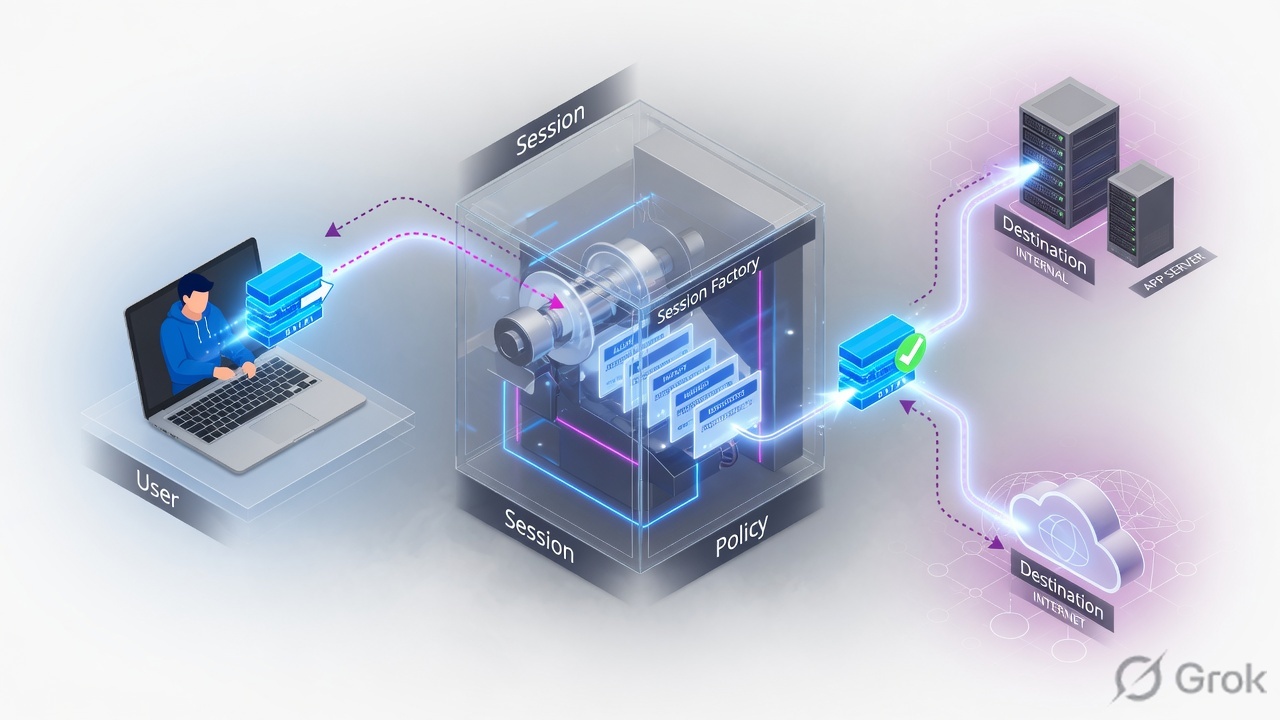
PAN-OS is session-based. A new 6-tuple walks slow path: zone protection, SYN check, route (egress zone), NAT lookup, User-ID, DoS, then security with application ANY. An existing session skips that walk. Security uses the original IPs and the post-NAT zones. NAT only translates on egress. App-ID is the application; service is the port. First match wins. I prove it with test security-policy-match and show session id.
1. Ticket hook — why the factory order matters
Night shift: “Internet is down for one VLAN.” Rule 12 is Allow, application ssl, service application-default, destination zone Untrust. Rule 4 above it is also Allow to Untrust with a URL Filtering profile that blocks the category. Moving 12 to the top “fixes” the user and breaks the control the SOC wanted.
That is the interview. Security rules are evaluated left to right and top to bottom. The first fully matching rule wins; later rules are not evaluated. A broader allow above a specific one hides it forever. And if the packet already has a session, the factory does not re-walk the list until that session dies or is discarded.
6-tuple — source IP, destination IP, source port, destination port, protocol, and ingress security zone (Packet Flow Sequence in PAN-OS). Slow path — first packet of a new session. Fast path — later packets of an existing session. First match — top-to-bottom, left-to-right; stop at the first rule that meets every criterion. application-default — allow the App-ID only on its standard ports. HIP — Host Information Profile from GlobalProtect, attached on the security rule Source Device. HA1 / HA2 — control link versus session-sync data link.
2. Mental model: session vs new packet
Every interview that goes well starts here. PAN-OS does not re-run NAT and security lookups for every packet.
Existing session (fast path)
Flow-table hit on the 6-tuple. PAN-OS applies the already-chosen NAT, interfaces, and rule action. If the session is marked discard (policy now deny, or a threat), the packet dies. This is why “I committed the rule and nothing changed” is usually leftover state, not a broken commit.
New packet (slow path)
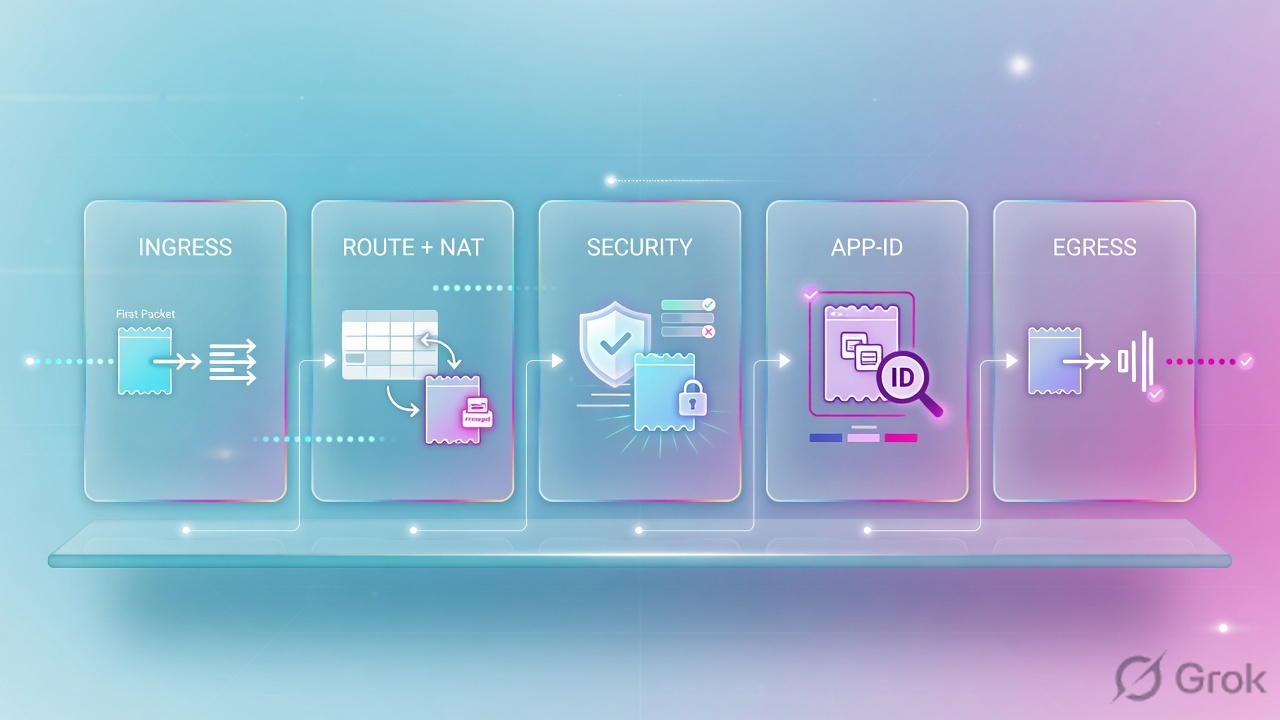
Ingress parse → session miss → zone protection → TCP SYN check → route (names egress zone) → NAT lookup → User-ID → DoS → security with application ANY → allocate the session. Destination NAT triggers a second route lookup on the translated address so the destination zone is post-NAT.
The client in PAN-OS language is whoever sent the first packet the firewall saw. That may not be the host’s idea of “client.” Reply traffic is the server-to-client flow of the same session. It does not need a second security rule.
Read the diamond first. New packet walks 1–5. Existing session skips to the table. That is the L2 interview opener.
3. First-packet order and first-match
Flowchart first. Official security-rule text: rules are evaluated left to right and top to bottom. A packet matches the first rule that meets every defined criterion. After that match, later rules are not evaluated. Put the more specific rule above the generic one.
Diamond = match. Green = stop. Red = keep walking or hit the default rule. Sources: Security Policy Rules; NAT Policy Rules.
First-packet security lookup uses application ANY. After App-ID names the application, PAN-OS consults the security rulebase again with that App-ID, the user, URL category, and the rest of the session key. If the newly identified application no longer matches the original allow, the session is torn down. That rematch is why “incomplete / insufficient-data on 443” can later become ssl or web-browsing and jump to a different rule.
Writing the security destination zone as the pre-NAT zone on a destination-NAT inbound rule. Official wording: if you use NAT, always reference the post-NAT zone, and always refer to the original (pre-NAT) IP addresses in source and destination. The NAT rule itself is matched on the pre-NAT zone. Two tables, two zone stories.
4. How to choose App-ID, NAT, HIP, HA, decrypt
Interviewers mix these on purpose. Keep the verbs separate: identify, translate, posture-check, fail over, inspect.
App-ID versus service
Application is what App-ID classified. Service is the Layer-4 port. You can set service to any, a custom port, or application-default (the default). application-default still inspects for all applications on all ports; it only allows the matched App-ID on its standard ports. Best-practice docs want application-default on most allow rules so evasive apps cannot ride a non-standard port.
| App-ID (Application column) | Service (port column) | |
|---|---|---|
| Job | Classify the application (signatures, decoders, heuristics) | Constrain the L4 port the application may use |
| First packet | Lookup uses application ANY; rematch after identify | Port is known immediately from the header |
| Choose when | Always — this is why you bought an NGFW | application-default unless a custom app must live on a non-standard port |
| Interview trap | “App-ID is just port 443” | Service any plus application ssl — anything that later rematches off ssl can still have used any port |
| Proof | Traffic log app; session application |
Traffic log dport; rule Service column |
NAT versus security
NAT translates. Security allows or denies. You must write both. Official flow: route lookup for egress zone → NAT rule match on original packet / pre-NAT zone → security on original IPs and post-NAT zones → translate source and/or destination only when the packet leaves.
| NAT rule | Security rule | |
|---|---|---|
| Does | Rewrite address / port at egress | Allow, deny, drop, or reset the session |
| Zone used to match | Pre-NAT zone (zone of the original IP) | Destination zone is post-NAT; source zone is ingress |
| Addresses used to match | Original packet | Original (pre-NAT) source and destination IPs |
| Order | Looked up on the first packet, applied on egress | Looked up after NAT decision and the (possibly second) route |
| Choose when | You need a public IP, inbound publish, or hide-NAT | Always, including for NAT’d traffic |
| Proof | Device → Troubleshooting → NAT; session xlate fields | test security-policy-match; traffic log rule name |
GlobalProtect HIP
HIP is not “antivirus on the portal.” The app collects host data. HIP objects filter that raw data. HIP profiles combine objects with AND / OR / NOT. The profile hangs on the security rule under Source → Source Device (up to 63 profiles). You need a GlobalProtect gateway license on each gateway that evaluates HIP. User-ID must be enabled on the source zone or the firewall will not generate HIP Match logs.
HA1 versus HA2, and what does not sync
HA1 is the control link: hellos, heartbeats, HA state, management-plane sync (config, routing, User-ID). HA2 is the data link: session table, forwarding tables, IPSec SAs, ARP. HA2 session traffic is unidirectional except keep-alives — active (or active-primary) to passive (or active-secondary). Enable Session Synchronization so the peer already has the session in its dataplane.
Official exceptions: active/passive peers do not sync ICMP or host sessions. A host session is one terminated on a firewall interface — a ping to the firewall itself, or a GlobalProtect tunnel. Active/active also skips host, multicast, and BFD sessions. Decryption docs add another hard line: the NGFW does not support HA sync for decrypted SSL sessions.
SSL Forward Proxy versus SSL Inbound Inspection
Both create two separate TLS sessions with the firewall as the proxy. Neither can decrypt client-auth or most pinned-certificate flows. Neither HA-syncs the decrypted session.
| SSL Forward Proxy | SSL Inbound Inspection | |
|---|---|---|
| Direction | Internal users → internet | External (or any) clients → your server |
| Certificate | Forward Trust / Forward Untrust impersonation of the server cert | The real server certificate and private key on the firewall (up to 12 per rule) |
| Choose when | You must inspect outbound TLS and can distribute a trusted CA | You publish an internal TLS server and can install its key |
| HA | No sync of decrypted SSL sessions | Same — decrypted SSL is not HA-synced |
| Proof | Decryption log; traffic-log flag 0x01000000 (SSL session decrypted) | Decryption log session-end reason; Policies → Decryption |
5. Do: policy match + session proof
Side A proves what PAN-OS thinks will match. Side B proves what a live session actually did. Side C is the close-out you say so the interviewer knows you will not clear the whole table.
Primary source for Side A: PAN-OS CLI Quick Start, Test Policy Matches, plus Device → Troubleshooting → Security Policy Match.
Side A — Device Troubleshooting (training mock)
Path: Device → Troubleshooting → Security Policy Match. Enter the same source, destination, destination port, and protocol you will later put in the CLI. The output names the first matching rule. Repeat with NAT Policy Match when translation is in the ticket. Official create-a-rule page: this test shows the best rule that matches those IPs and the protocol.
Device / Troubleshooting / Security Policy Match
Security Policy Match
Training mock · field names from Device → Troubleshooting → Security Policy Match and the official test command. Dummy RFC 5737 addresses only. Lab result: rule LAN-WEB — LAN → Untrust, app ssl, service application-default, action allow.
Side B — CLI: test, then the live session
-
Test the security rule the official way
The CLI Quick Start example uses
test security-policy-matchwith source, destination, destination-port, protocol, application, and optionally source-user. Protocol 6 is TCP.PAN-OS · Test Policy Matchestest security-policy-match \ source 10.20.30.44 \ destination 203.0.113.80 \ destination-port 443 \ protocol 6 \ application ssl
-
Test NAT the same tuple
Device → Troubleshooting also runs a NAT match on those fields. Confirm the NAT rule name and the translated address before you argue about the security destination zone.
-
Reproduce once, then read the session
Have the user retry one HTTPS hit. Then:
PAN-OS · session evidenceshow session all filter source 10.20.30.44 destination 203.0.113.80 show session id <id>
Quote rule name / index, application, ingress and egress zones, and the xlate addresses. That pair is how you prove NAT versus security without waving at the GUI.
-
Confirm the traffic log, not ping
Monitor → Logs → Traffic. Fields that close a ticket:
rule,app,from/tozones,natsaddr/natdaddr,action, session-end reason. Decrypt tickets add Monitor → Logs → Decryption.
clear session all on a production vsys “to make the new rule take.” That drops every user. Filter the session, or wait for idle timeout, or change the rule so PAN-OS marks the session discard. Do not treat ping as proof of HTTPS, App-ID, HIP, or decryption.
Side C — Close the change window
Say this: I tested with the 5-tuple, I quoted the matching rule and the session id, I did not clear the whole table, I retested the original application. If HIP is in the rule, I also opened Monitor → Logs → HIP Match — that log does not require a security-rule hit.
6. Runtime path after go-live
Once the session exists, production tickets are mostly “why is this still the old path?”
- User sends another packet with the same 6-tuple.
- PAN-OS finds the C2S or S2C flow and follows the session.
- NAT from the session is applied at egress. The rule name on the session does not change because you edited rule 12 in the GUI.
- If App-ID shifts (incomplete → ssl → web-browsing), security is consulted again. A new deny can discard a session that started as allow.
- If you need the new rule for this flow, wait for age-out, or clear that session id — not
clear session all. - On active/passive failover: HA2 must have been syncing sessions. ICMP and host/GP-terminated sessions were never in that table. Decrypted SSL was never in that table.

7. Eight interview scenarios
Each one is a production ticket. Answer with the direct line, then the evidence. Weak answers reboot, clear every session, or confuse NAT with security.
Q1 · Scenario — session factory, rule edited, user still works
You tighten rule 12 from application any to ssl. A long-lived TCP/443 session still flows. A new connection to TCP/22 is denied. Explain both.
interzone-default deny (or the next matching deny).clear session all on the vsys.Strong framing (say this)
I filter show session all for that source, quote application and rule, then decide whether this packet is new or old.
Evidence to name
show session all filter source / show session id; Monitor → Logs → Traffic; rule hit count.
Q2 · Architecture — zones, intra versus inter
Two servers share zone LAN. A third server is in zone DMZ. No custom rules exist. Who talks?
intrazone-default (allow). LAN-to-DMZ matches interzone-default (deny). Zones in a security rule must be the same type (L3 to L3). Destination zone is the egress interface’s zone after the route.Strong framing (say this)
Same zone type, source zone from ingress, dest zone from the route (or the DNAT second lookup). Then first-match.
Evidence to name
Network → Zones; virtual router FIB; default rules at the bottom of Policies → Security.
Q3 · Compare — App-ID versus service
Rule allows application web-browsing, service application-default. The site listens on TCP/8443. The packet is identified as web-browsing. Does it pass?
application-default only permits the application on its standard ports (HTTP/80, HTTPS/443 for browsing). 8443 is non-standard. Either change service to a custom TCP/8443 object, or (better) understand why the app is off-port.any is how malware rides 443 and how shadow IT hides on 8443. Best-practice docs want application-default on most allows.application-default.Strong framing (say this)
App-ID is what. Service is where. I only open a non-default port as a scoped exception.
Evidence to name
Rule Service column; traffic log dport plus app; Objects → Services.
Q4 · Compare — NAT versus security on inbound publish
Public 203.0.113.80 destination-NATs to 10.0.10.20 in zone Servers. Draw the security rule in words.
Strong framing (say this)
Pre-NAT zone for the NAT rule. Post-NAT dest zone and pre-NAT IPs for security. Two tests: NAT match, then security match.
Evidence to name
Device → Troubleshooting NAT + Security; session xlate vs original; official NAT Policy Rules paragraph on pre-NAT IPs / post-NAT zones.
Q5 · Troubleshoot — first-match hides the intended rule
Rule 5 allows facebook-base. Rule 12 denies social-networking. Users still reach Facebook. What is the first check, not the tenth?
interzone-default. There is no safe “turn off default deny” in production.Strong framing (say this)
I read the rulebase top-down, then I prove with test security-policy-match using the identified application.
Evidence to name
test security-policy-match application facebook-base …; traffic log rule name; Policies → Security order.
Q6 · Evidence — GlobalProtect HIP never hits
Contractors connect to the gateway. The HIP-enabled allow never increments. HIP objects look correct. First check?
Strong framing (say this)
Objects filter, profiles Boolean-combine, profiles hang on the rule, User-ID on the zone, HIP Match log first.
Evidence to name
Device → Licenses; Network → Zones → Enable User Identification; Objects → GlobalProtect → HIP Profiles; Monitor → Logs → HIP Match.
Q7 · Architecture — HA failover dropped the interesting sessions
Active/passive pair. Primary loses power. Most TCP users stay up. Pings to a firewall interface drop. Long decrypted HTTPS drops. Why both?
Strong framing (say this)
HA1 = control and config. HA2 = sessions, one-way. I name the three things that do not come across: ICMP/host, GP-terminated, decrypted SSL.
Evidence to name
Device → High Availability → HA Communications (HA1 / HA2, Enable Session Synchronization); show high-availability state; decryption docs “doesn’t support HA sync for decrypted SSL sessions.”
Q8 · Unsafe shortcut — decrypt outbound with the server key
A junior imports a public website’s certificate into an Inbound Inspection rule so “outbound Facebook is inspected.” What do you stop, and what do you build instead?
Strong framing (say this)
Forward Proxy outbound, Inbound Inspection for owned servers, exclusions for pin/privacy, decryption log for proof, no decrypted-SSL HA story.
Evidence to name
Policies → Decryption type; Forward Trust cert; Inbound Inspection server cert (max 12); Monitor → Logs → Decryption.
8. Traps and proof checklist
| Trap | What you see | Safer next step |
|---|---|---|
| Broader allow above the specific rule | Rule 12 never increments, rule 5 does | Read top-down; move the specific row up; do not delete interzone-default |
| Edited rule, old session | User still reaches the old app/port | Filter show session all; clear that id only if change control allows |
| Security dest zone is pre-NAT | Inbound publish hits interzone-default |
DNAT second route lookup → post-NAT dest zone; original public IP in dest address |
| Service any + App-ID allow | App on a weird port still passes | Set application-default unless you have a scoped custom service |
| HIP object without profile / User-ID | HIP Match empty, rule idle | Enable User-ID on the zone; attach the HIP profile on Source Device |
| “HA is fully stateful” | ICMP-to-self, GP tunnel, or decrypted HTTPS dies on failover | Quote HA Synchronization + no decrypted-SSL HA sync |
| Inbound Inspection used for outbound SaaS | No decrypt, or handshake fails | Forward Proxy + client-trusted CA; no-decrypt for pins |
clear session all as a fix |
Every user drops | Filter one 6-tuple; retest the original app, not ping |
- Vsys + ingress zone + 6-tuple spoken.
- Route exists; dest zone is the egress (post-NAT if DNAT) zone.
test security-policy-match(and NAT match) names a rule.show session idshows that rule, application, zones, and xlate.- If HIP is involved: User-ID on the zone and a HIP Match log line.
- Original application retested — not ping unless the ticket is ICMP.
Knowledge check
Six judgment items. Each maps to a promise bullet. Check answers, then reset and re-read the traps table if you miss any.
Sources
- Packet Flow Sequence in PAN-OS — ingress, 6-tuple, slow path 3.1–3.8, fast path, App-ID, egress
- Security Policy Rules — first-match, default intra/inter rules, post-NAT destination zone
- Components of a Security Policy Rule — application, service / application-default, HIP profile, pre-NAT addresses
- Security Policy Rule Best Practices — set Service to application-default
- NAT Policy Rules — NAT ≠ security; pre-NAT IPs; post-NAT zones; translate at egress
- Set Up a Basic Security Policy — first matching rule; no inter-zone flow without an allow
- How Do Zones Protect the Network? — same zone type; no lateral movement by default
- PAN-OS CLI Quick Start — Test Policy Matches —
test security-policy-match - Create a Security Policy Rule — Device → Troubleshooting → Security Policy Match
- Configure HIP-Based Policy Enforcement — objects, profiles, Source Device, User-ID on zone, HIP Match log
- HA Links and Backup Links — HA1 control, HA2 sessions
- Reference: HA Synchronization — session table exceptions (ICMP / host sessions)
- SSL Forward Proxy — outbound proxy; no HA sync for decrypted SSL
- SSL Inbound Inspection — inbound to your server; server key; no HA sync for decrypted SSL
- Traffic Log Fields — app, action, NAT flags, decrypt flag, session-end reasons
Related: Session factory · Session flow · Zones, interfaces, VR · Security policy · NAT · SSL decryption · GlobalProtect · HA modes · SP3 architecture · Palo Alto interview hub