An event is a log line. An alert is a detection that fired. An incident is a case I own. I do not trust severity alone. I prove the raw event, name the entities, map MITRE, then classify: true, benign, or false. I escalate when the host is crown-jewel, the account is privileged, or the chain left the L1 playbook. I never close false-positive without the raw event and a tuning ticket.
1. Ticket hook — 47 High, one DC
Night shift. The SIEM queue shows 47 High notables. Forty of them are “SMB lateral movement” from 10.20.8.14 — the Qualys scanner that always runs at 02:00. One is “LSASS memory access” on DC01 by svc-backup at 02:11. A junior wants to close the forty as False Positive with no comment and page IR for every remaining High.
That is the interview. NIST SP 800-61r3 is explicit: triage, prioritization, and escalation follow risk — asset criticality and impact — not the color of the first card. Microsoft Sentinel and Splunk ES both force a close classification. “False Positive” is not a synonym for “I am tired.” The scanner is likely a benign positive (suspicious but expected). The LSASS handle on a domain controller is a different ticket.
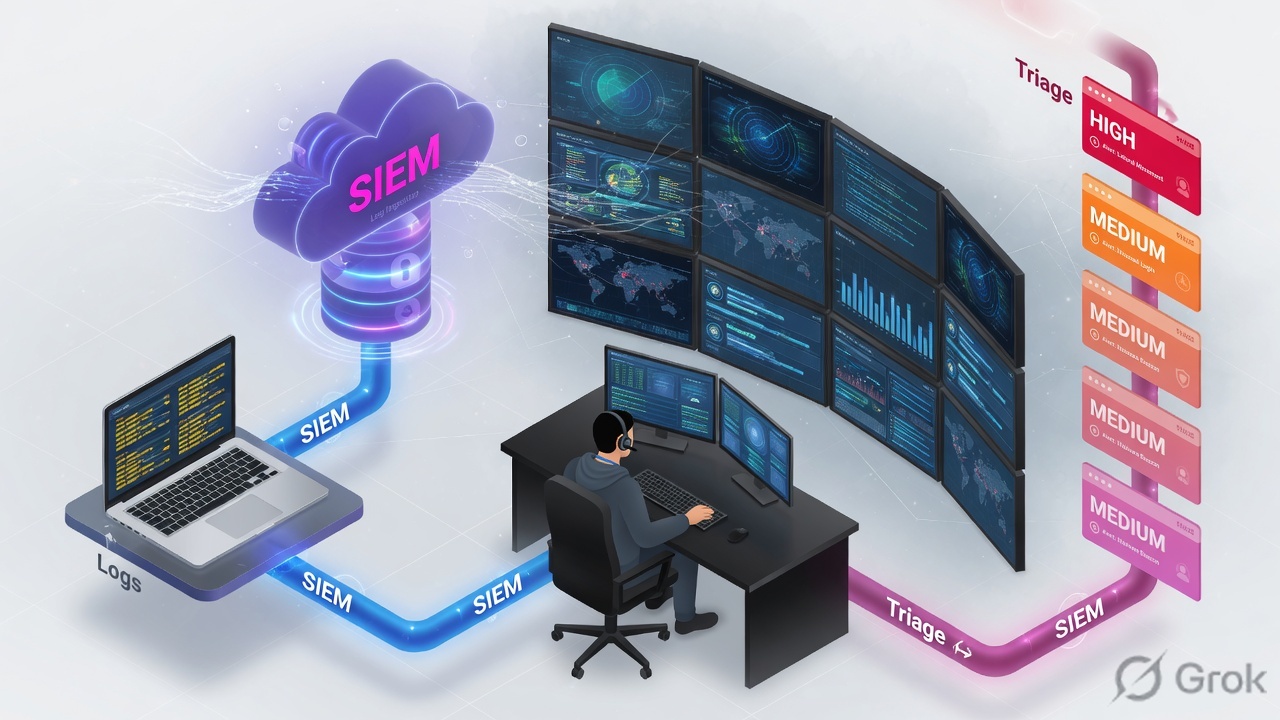
Event — a single log record (Windows 4624, syslog line, EDR telemetry). Alert / notable / finding — a detection that fired on one or more events. Incident — a case you investigate and close. Triage — first-pass validate, enrich, classify, and queue. Severity — how bad the detection author thinks the activity is. Priority — the order you work it (asset + privilege + blast radius + time). True positive — malicious, correctly detected. Benign positive — real activity, expected (scan, admin, pen-test). False positive — incorrect logic or bad data. False negative — a real attack the rule missed. Escalate — hand a scoped evidence pack to L2 / IR when you exceed the playbook.
2. Mental model: event → alert → incident
Interviewers mix these three words on purpose. Keep them on different layers. NIST SP 800-92’s SIEM picture is still the right spine: collect → filter / aggregate → normalize → correlate → prioritize → respond. The dashboard is the last station, not the first proof.
What the SIEM owns
Ingestion, parse, CIM / schema fields, correlation searches or analytics rules, risk scoring, the incident object. If src is empty, you do not have a host — you have a broken parse.
What the analyst owns
Validation of the raw event, asset/user context, the MITRE hop, the close classification, the escalate-or-tune decision, and the comment another analyst can replay at 04:00.
SOC tiers sit on that spine. L1 follows the playbook: validate, classify, contain only what the runbook allows, escalate. L2 hunts the chain, scopes hosts and identities, recommends containment. L3 / IR owns malware, threat-intel attribution, and recovery decisions. Do not pretend L1 “investigates ransomware.” Do not dump a High card on IR with no entities.
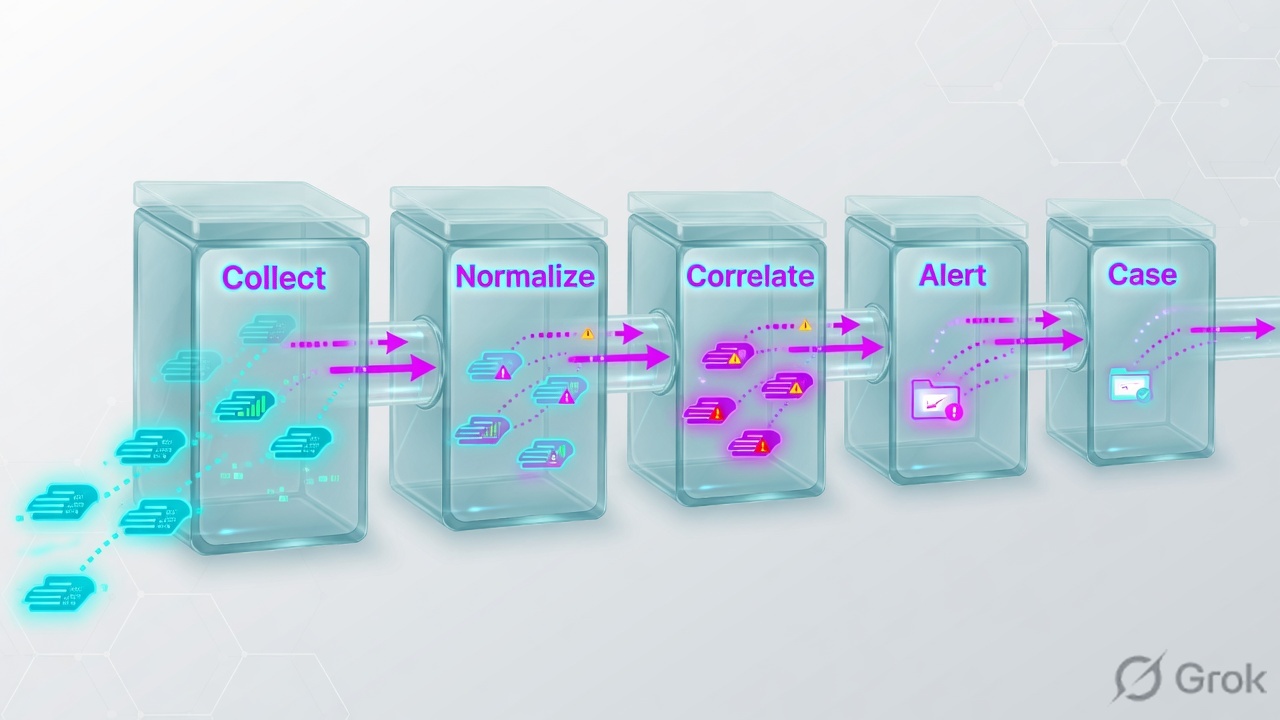
3. Triage decision flow
Flowchart first. You do not start by changing severity. You start by proving the telemetry exists, then you ask whether the activity is malicious, expected, or a broken rule.
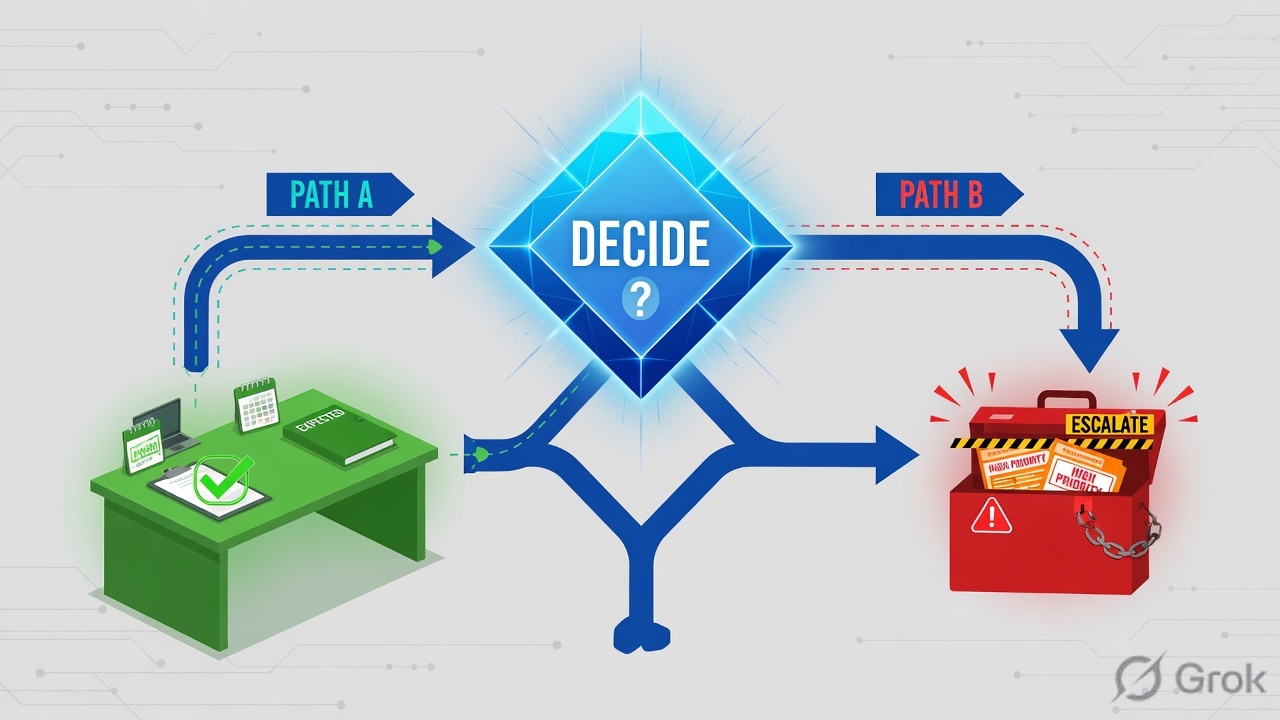
Read left → right, then down. No raw events = you do not have a true positive. Diamond = classify. Priority is a later box than severity.
4. How to classify and escalate
Use the vendor words in the room. Microsoft Sentinel’s mandatory close list is: True Positive – suspicious activity, Benign Positive – suspicious but expected, False Positive – incorrect alert logic, False Positive – incorrect data, Undetermined. Splunk ES 8 findings use the same four ideas (True Positive – Suspicious Activity, Benign Positive – Suspicious But Expected, plus the two false-positive reasons).
| Classification | What is true in the world | What the rule did | Your next verb |
|---|---|---|---|
| True positive | Malicious or unauthorized | Fired correctly | Contain per playbook; escalate if crown-jewel, privileged, or chain left L1 |
| Benign positive | Activity happened and looks like the TTP | Fired correctly | Close with the change / scan ticket; time-bound automation or watchlist — not “FP” |
| False positive — logic | Not that TTP | Over-broad analytic | Tune the query or add a documented exception; do not disable the whole rule |
| False positive — data | Field is wrong / spoofed / unparsed | Trusted a bad field | Fix the TA / parser / CIM map; treat as a detection-engineering ticket |
| False negative | Attack happened | No alert | Hunt from the missed host; write or restore coverage — this is worse than a noisy rule |
| Undetermined | Not enough telemetry | Unknown | Escalate with the gap named; do not invent a close reason |
Calling a Qualys or Nessus window a false positive. If the scan really did hit SMB admin shares, the rule told the truth. That is benign positive / suspicious but expected. False positive is reserved for incorrect logic or incorrect data. Microsoft’s FP guidance is explicit: known scanner IPs get a time-bound automation exception or a watchlist — they do not get “disable the analytic.”
When L1 must escalate
Escalate when any one of these is true, and take the evidence pack with you: confirmed credential dump (T1003 / T1003.001), lateral movement off a foothold, a privileged or service account, a domain controller / identity / backup / OT crown jewel, suspected ransomware or data staging, or anything the playbook says “stop — IR.” Do not escalate “because it is High.” Do not sit on LSASS-on-DC “because EDR is noisy.”
5. Do: notable → hunt → close or page
Primary sources for this block: Microsoft Sentinel “Investigate incidents” + “Handle false positives”; Splunk ES Incident Review dispositions; NIST SP 800-61r3 (triage / escalate on risk). Vendor consoles differ. The order does not.
Side A — Read the notable, not the color
-
Claim the card and freeze the clock
Assign the incident to yourself. Note first event time, last event time, rule name, and severity. Severity is a hint. First-event time is the start of your hunt window.
-
Write the entities on paper
Host /
dest, source /src,user, process or hash,signatureor analytic name, MITRE technique if tagged. If a required field is empty, stop — that is a parse problem, not a closed true positive. -
Open the raw contributing events
Incident Review / Incidents → the notable → contributing events. You need the Windows Event ID, Sysmon ID, or EDR action — not the dashboard sentence.
Incidents / INC-1842 / Overview
LSASS memory access
Training mock. Field names follow Splunk CIM-style src / dest / user / signature plus a MITRE technique ID. Source: Splunk CIM Alerts + ATT&CK T1003.001.
Side B — Hunt one hop left and one hop right
-
Confirm the process, not the rule title
For T1003.001 you want a non-expected process opening
lsass.exewith dump-level access, or a dump file write. ATT&CK DET0363 describes that sequence. A backup agent that is supposed to read LSASS is a different story thanrundll32.execallingcomsvcs.dll MiniDump. -
Pivot 30–60 minutes on the same host and user
Same
dest: 4624 logons, 4688 / Sysmon 1 process creates, 4769 Kerberos, outbound C2, SMB to other DCs. Sameuser: other hosts. A single technique tag is a hint; a chain is the case. -
Map tactic → technique → procedure out loud
Tactic = why (TA0006 Credential Access). Technique / sub-technique = how (T1003.001 LSASS Memory). Procedure = this binary, this command line, this dump path. Interviewers fail people who say “it’s MITRE lateral movement” with no ID.
index=wineventlog OR index=edr dest=DC01
  earliest=-30m@m latest=+30m@m
| table _time dest src user signature process parent_process file_path
| sort _time
Side C — Classify, then stop or page
-
Pick one official close reason
Sentinel / Splunk ES language only. Benign scan ≠ false positive. Undetermined if you lack logs — say which index or sensor is dark.
-
If true positive and in playbook: contain, then write the pack
L1 containment is whatever the runbook already allows (isolate a workstation, disable a named user after approval). Domain controller isolation is almost never an L1 solo call. Escalate with: entities, timeline, MITRE IDs, raw event IDs, what you already did, what you need IR to do.
-
If benign or false: leave a replayable comment and a tune ticket
Microsoft’s preferred FP path is a time-bound automation rule or a watchlist exception, default expiry 24 hours unless SOC engineering owns a permanent query change. Closing 40 cards with no comment is how the next shift re-opens them.
Hunting / dest=DC01 / last 60 minutes
Contributing events
| Time (Z) | signature | src | user | MITRE |
|---|---|---|---|---|
| 02:00:04 | SMB admin share (scan) | 10.20.8.14 | svc-qualys | T1021.002 |
| 02:03:11 | 4624 Network logon | 10.20.8.14 | svc-qualys | — |
| 02:11:08 | Handle to lsass.exe | 10.20.4.88 | svc-backup | T1003.001 |
| 02:11:19 | lsass.dmp written | DC01 | svc-backup | T1003.001 |
Two different src values. The scanner row is expected at 02:00. The dump file on DC01 is the escalate. Do not merge them because they share a High queue.
6. Runtime path after go-live
After a rule is in production, the interesting tickets are almost always missing parse, wrong close reason, or a chain the single analytic cannot see — not “the SIEM is down.”
NIST SP 800-92: the SIEM server correlates across sources, prioritizes significant events, and can initiate a response. The analyst still owns the classification.

7. Eight interview scenarios
Each one is a production ticket. Answer with the direct line, then the evidence. Weak answers change severity, disable the rule, or page IR with no entities.
Q1 · Scenario — first five minutes on a High notable
A High “PowerShell encoded command” fires on jump-host JMP-04 at 02:17. The hiring manager asks: “What do you do before you touch severity or Slack IR?”
Strong framing (say this)
I do not trust the title. I quote the process tree and the decoded command, then I pick a close reason.
Evidence to name
dest=JMP-04, user, _time, parent process, command line, contributing Event ID 4688 / Sysmon 1, MITRE T1059.001.
Q2 · Compare — severity versus priority
Two cards land together. A High “malware hash” on a lab VM with no privileged users. A Medium “impossible travel” on the CFO’s mailbox plus a new inbox rule. Which do you work first, and why?
Strong framing (say this)
Severity is the author’s guess. Priority is my order. I say the asset and the identity out loud.
Evidence to name
CMDB / asset criticality, user role, first-event time, mailbox audit (New-InboxRule), hash verdict on the lab VM.
Q3 · Evidence — which fields prove a true positive
A lead says “the dashboard is red, so it is real.” What do you put in the ticket so a second analyst can replay the proof?
src, dest, user, signature (or analytic name), _time, Event ID or EDR action, file hash if present, and the contributing-event search. A MITRE tag without those fields is decoration.Strong framing (say this)
If I cannot name src, dest, user, signature, and the raw event ID, I do not have a true positive yet.
Evidence to name
Splunk CIM Alerts fields; Sentinel incident entities; Windows 4624/4688 or Sysmon 1/10; hash vs VT / internal allow-list.
Q4 · Compare — true, benign, false, missed
Weekly Qualys from 10.20.8.14 fires 80 “SMB lateral movement” analytics at 02:00. Same week, a real attacker uses the same share path on a finance PC and no alert fires because someone disabled the rule. Name the four outcomes.
Strong framing (say this)
Expected real activity is benign. Wrong logic is false. A miss is a false negative — worse than noise.
Evidence to name
Scanner change ticket and source IP; Sentinel classification enum; watchlist / 24-hour automation exception; the missing analytic on the finance host.
Q5 · Architecture — draw the SIEM walk
“Walk me through what happens after a Windows host writes 4688 until an analyst sees a notable.” They want order, not a product brochure.
dest, user, process). A scheduled analytic or risk rule correlates one or more events. A notable / incident is created, optionally SOAR-enriched, and lands on Incident Review. The analyst still classifies it.user is a pipeline bug, not an anonymous attacker.Strong framing (say this)
Collect, normalize, correlate, alert, case. I can point at the station that broke.
Evidence to name
NIST SP 800-92 SIEM paragraph; index + sourcetype; CIM map; correlation search / analytics rule; Incident Review / Incidents queue.
Q6 · Troubleshoot — scanner dressed as lateral movement
Forty High “T1021.002 SMB/Windows Admin Shares” notables, all src=10.20.8.14, all in the documented Qualys window. A junior already started closing them as False Positive with no comment. First check, not “tune later.”
Strong framing (say this)
Same technique, different src. I allow-list the scanner identity and time, not the TTP.
Evidence to name
src=10.20.8.14, scan window, asset record, Sentinel automation rule expiry, remaining notables with other sources.
Q7 · Troubleshoot — LSASS on the DC, escalate
EDR shows a handle to lsass.exe with full access and a lsass.dmp write on DC01 by svc-backup at 02:11. A teammate says “backup accounts do that, close it.” What do you prove, and when do you page IR?
rundll32, procdump, comsvcs.dll MiniDump, or a dump path that is not the backup target — this is a true positive on a domain controller. Escalate immediately with the timeline. L1 does not isolate a DC alone.Strong framing (say this)
I escalate the procedure, not the username. DC plus dump file is IR unless the exact backup binary is proven.
Evidence to name
T1003.001, process / parent, dump path, 4688/Sysmon 10, 4624 onto DC01, other dests for svc-backup, IR evidence pack.
Q8 · Unsafe shortcut — close 40 as FP and disable the rule
Queue pressure. Someone disables the SMB-admin analytic “until Monday” and bulk-closes the scanner burst as False Positive. What do you undo, and what is the safer path?
Strong framing (say this)
I exception the entity and the clock. I do not exception the technique.
Evidence to name
Analytics rule enabled=true; automation rule conditions + expiry; watchlist name; hunt for T1021.002 from non-scanner src during the dark window.
8. Traps and proof checklist
| Trap | What you see | Safer next step |
|---|---|---|
| Severity = priority | High lab hash worked before VIP mailbox | Reorder on asset + identity + blast radius (800-61r3) |
| Scanner called false positive | 80 T1021.002 from one known IP | Benign positive + time-bound exception |
| Close with no raw event | Empty src/user, dashboard only | Undetermined or FP-data; fix parser |
| Disable the noisy rule | Queue goes quiet; finance PC later compromised | Watchlist / 24h automation; hunt the dark window |
| MITRE tag = investigation | Rule says TA0008, no chain | Map tactic / technique / this procedure; pivot ±30 min |
| Service account = trusted | svc-backup dumped LSASS on DC01 | Prove the binary; T1078 + T1003.001 if not the agent |
| Page IR with no pack | Slack: “High on DC” | Entities, timeline, Event IDs, MITRE, what L1 did |
| L1 isolates a DC | Authentication outage + lost telemetry | Escalate; workstation isolate is the usual L1 contain |
| 800-61r2 recitation only | “Four phases” with no triage verb | r3: Detect/Respond on risk; still know r2 phases if asked |
| SIEM “blocked it” | Analyst credits the dashboard | Name EDR / FW / SOAR action; SIEM prioritized |
- Entities spoken: dest, src, user, signature, first/last time.
- Raw contributing event named (Event ID / Sysmon ID / EDR action), not only the notable title.
- MITRE spoken as tactic + technique ID + this procedure.
- Official close reason: TP / benign / FP-logic / FP-data / undetermined — scanner is not FP.
- If recurring expected noise: watchlist or time-bound automation, not a disabled analytic.
- If escalate: pack includes timeline, IDs, what L1 already did, and the decision IR must make.
Knowledge check
Six judgment items. Each maps to a promise bullet. Check answers, then reset and re-read the traps table if you miss any.
Sources
- NIST SP 800-61 Rev. 3 — Incident Response Recommendations (CSF 2.0 Community Profile); triage, prioritization, escalation on risk
- NIST SP 800-61r3 PDF
- NIST SP 800-61 Rev. 2 — four-phase IR lifecycle still asked in interviews
- NIST SP 800-92 — Guide to Computer Security Log Management (SIEM collect, normalize, correlate, prioritize)
- MITRE ATT&CK® — Enterprise matrix (tactic / technique / procedure)
- ATT&CK T1003.001 — OS Credential Dumping: LSASS Memory
- ATT&CK T1021.002 — Remote Services: SMB/Windows Admin Shares
- ATT&CK T1059.001 — Command and Scripting Interpreter: PowerShell
- Microsoft Learn — Handle false positives in Microsoft Sentinel (automation vs query; 24h expiry; watchlists)
- Microsoft Learn — Investigate incidents (close classifications: TP / benign / FP logic / FP data / undetermined)
- Splunk ES 8 — Configure dispositions for findings (True Positive / Benign Positive / False Positive reasons)
- Splunk ES 7 — Triage notables on Incident Review
- CISA — Federal Government Cybersecurity Incident and Vulnerability Response Playbooks
Related: Wireshark interview · Linux interview · VAPT interview · SOC 2.0 AI triage · Interview hub